Demole Squirrel Box
A cedar feeding box with a camera in the ceiling. Squirrels go in through a 3" hole, eat, and hang out. You watch live on your phone from anywhere.
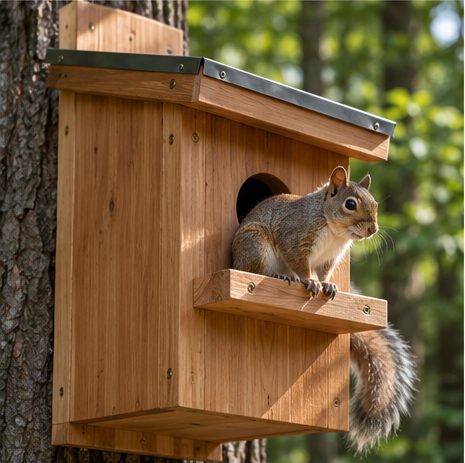
Two parts, built independently. The box is plain woodwork from one 6' cedar board. The camera is a Raspberry Pi Zero 2 W and a Camera Module 3 Wide sealed in a small weatherproof box on the roof, looking down through a clear window. The box works on its own; add the camera whenever.
00 How it fits together
01 The box
Reference looks
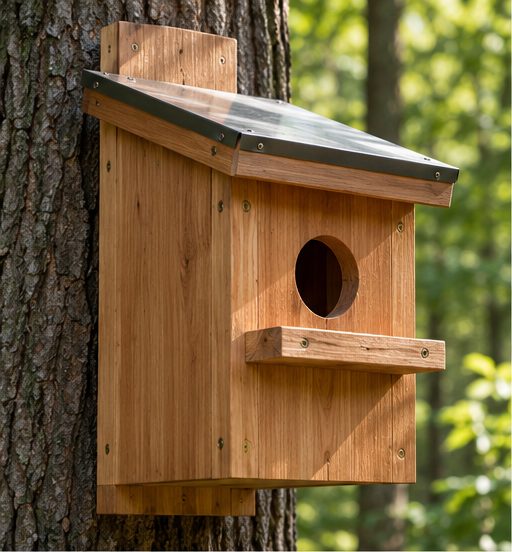
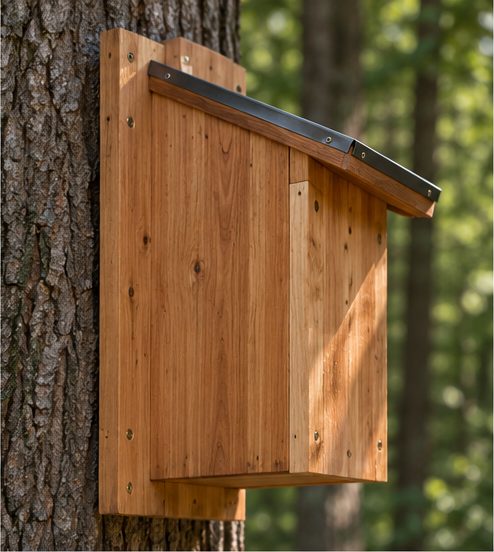
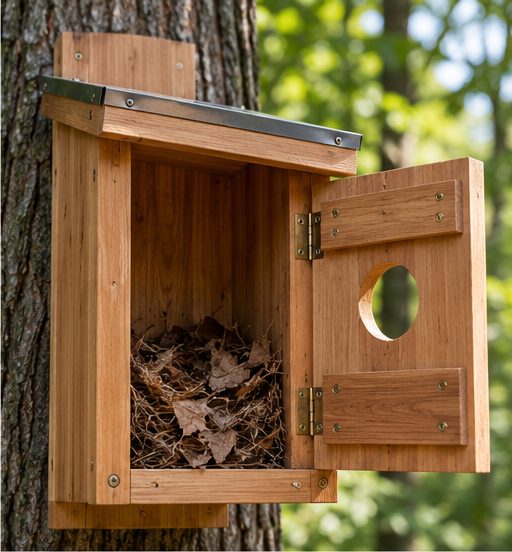
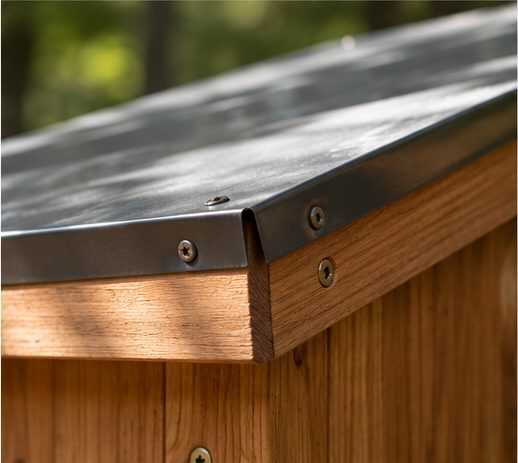
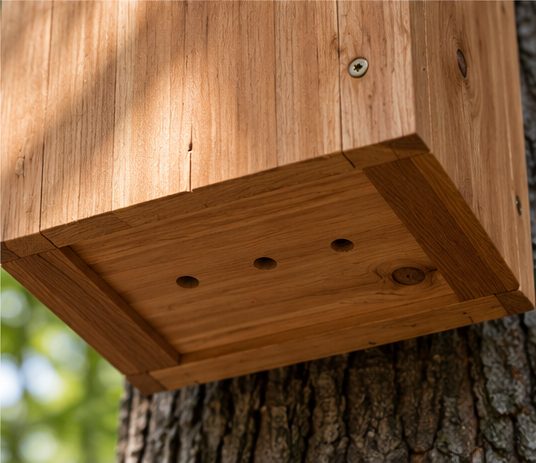
Where the references differ from the plan below: they show a sloped roof with metal flashing (plan: flat cedar roof), a perch under the hole (plan: none), a hinged front panel for access (plan: the roof unscrews), the back board extending above the roof (plan: below the floor), and five drain holes (plan: four). A sloped roof would also tilt the camera box, so the window and mount would need an angled spacer.
Lumber is a 1×8 cedar board, which is ¾" × 7¼" actual. All six pieces come from one 6' board with about 13" left over. Sides overlap the front and back edges; the floor sits inside, raised ¼" for drainage.
Cut list — one 1×8 × 6' cedar board
| Piece | Qty | Size | Notes |
|---|---|---|---|
| Front | 1 | 7¼" × 9" | 3" hole, center 6½" up from bottom edge |
| Back | 1 | 7¼" × 13" | Extends 4" below the box for mounting screws |
| Sides | 2 | 7¼" × 9" | Overlap front and back edges |
| Floor | 1 | 7¼" × 5¾" | Four ¼" drain holes; set ¼" up from bottom |
| Roof | 1 | 7¼" × 12" | 1⅝" overhang each side; 1¼" camera hole centered |
| Board used | ≈ 58½" | Includes six ⅛" saw kerfs; ~13" spare | |
Build steps — box
- CUTCut the six pieces. Cut the 3" entrance with a hole saw, and drill the four ¼" drain holes in the floor.
- ROOF HOLEDrill a 1¼" hole through the roof, centered left-to-right and front-to-back. This is the camera's window.
- ASSEMBLEGlue (exterior glue) and screw sides to front and back with 1¼" exterior screws, predrilled. Set the floor inside, ¼" up, and screw through the sides.
- ROOFScrew the roof down with 4 screws, no glue, so it comes off for cleaning. Leave the cedar unfinished inside.
- MOUNTScrew through the 4" back extension into a tree or 4×4 post, box floor about 5' up, within strong Wi-Fi range of the house.
02 The camera
The Pi and camera live in a small gasketed electrical box screwed to the roof. A 2" clear acrylic disc is sealed between the box and the roof hole, so the lens looks down into the box while the electronics stay dry and out of reach of teeth.
Parts list — camera
| Part | Qty | Price | Notes |
|---|---|---|---|
| Raspberry Pi Zero 2 W | 1 | ~$15 | Wi-Fi built in (2.4 GHz only) |
| Raspberry Pi Camera Module 3 Wide (standard, not NoIR) | 1 | ~$35–45 | 120° lens, autofocus down to close range |
| Pi Zero camera cable (22-pin to 15-pin) | 1 | ~$5 | The cable in the camera box does not fit the Zero |
| microSD card, 32 GB | 1 | ~$10 | |
| Official Pi micro-USB power supply (5.1 V, 2.5 A) | 1 | ~$8 | See power note below |
| IP65 junction box, ~4"×4", light color | 1 | ~$10 | Light color keeps summer heat down |
| Cable gland (PG7) + clear silicone | 1 | ~$8 | Seals the power cable entry and the window |
| 2" × ⅛" clear acrylic disc | 1 | ~$5 | Or cut from scrap acrylic |
| Desiccant pack | 1 | ~$2 | Inside the junction box, against condensation |
| Camera total | ~$98–108 | Plus cedar, screws, and a 3" hole saw if you don't have one | |
Why the standard camera, not NoIR: grey squirrels are active in daylight. The NoIR version has no infrared filter, so daytime color comes out washed and pink. Choose NoIR plus an IR light only if you want night footage (for example, flying squirrels, raccoons).
Power: 5 V over a long USB cable drops voltage and the Pi will brown out. Keep the USB run under about 10'. If the outlet is farther, use an 802.3af PoE injector indoors, outdoor-rated Cat6 to the box, and a PoE-to-micro-USB splitter inside the junction box. Run any cable in conduit or split loom; squirrels chew cable.
Build steps — camera
- FLASHIn Raspberry Pi Imager, choose Raspberry Pi OS Lite (64-bit). In the settings set hostname
squirrelcam, your Wi-Fi, a username, and enable SSH. - ASSEMBLEConnect the camera to the Pi with the Zero cable (check the contact orientation at both ends before seating it). Drill a 1¼" hole in the bottom of the junction box, line it up over the roof hole, and sandwich the acrylic disc between them in a bead of silicone. Mount the camera face-down over the window; drop in the desiccant; run power through the cable gland.
- CHECK CAMERAPower up, wait ~90 seconds, then from a computer on the same Wi-Fi:
ssh <your-username>@squirrelcam.local
rpicam-hello --list-cameras
You should see one camera listed (imx708_wide). - INSTALL STREAMERMediaMTX streams the Pi camera directly. Download the arm64 build from the MediaMTX releases page:
VER=$(curl -s https://api.github.com/repos/bluenviron/mediamtx/releases/latest | grep -oP '"tag_name": "\K[^"]+') mkdir -p ~/mediamtx && cd ~/mediamtx curl -L -o mtx.tgz https://github.com/bluenviron/mediamtx/releases/download/$VER/mediamtx_${VER}_linux_arm64.tar.gz tar xzf mtx.tgz - CONFIGUREOpen
~/mediamtx/mediamtx.yml, go to thepaths:section at the bottom, and replace everything under it with:paths: cam: source: rpiCamera rpiCameraWidth: 1280 rpiCameraHeight: 720 rpiCameraFPS: 15720p at 15 fps is a conservative start for the Zero 2 W over Wi-Fi. Raise it once the stream is stable. - RUN ON BOOT
sudo tee /etc/systemd/system/mediamtx.service >/dev/null <<EOF
[Unit]
After=network-online.target
[Service]
ExecStart=/home/$USER/mediamtx/mediamtx /home/$USER/mediamtx/mediamtx.yml
Restart=always
User=$USER
[Install]
WantedBy=multi-user.target
EOF
sudo systemctl enable --now mediamtx
- WATCH AT HOMEOn any device on your Wi-Fi, open
http://squirrelcam.local:8889/camin a browser.
03 Watching from anywhere
Tailscale puts the Pi and your phone on a private network. Nothing is exposed to the public internet and no router changes are needed.
- PIOn the Pi:
curl -fsSL https://tailscale.com/install.sh | sh
sudo tailscale up
Open the login link it prints and sign in. - PHONEInstall the Tailscale app on your phone and sign in with the same account.
- WATCHWith Tailscale on, open
http://squirrelcam:8889/camon your phone. Add it to your home screen for one-tap access. - FALLBACKIf the live view won't connect over cellular, use
http://squirrelcam:8888/caminstead. It's the HLS stream: a few seconds of delay, but it works on more networks.
04 Food and placement
- What to put in: unsalted in-shell peanuts, black-oil sunflower seed, and some dried corn. A small handful a day keeps squirrels coming back without piling up spoiled food.
- What to leave out: salted or seasoned nuts, bread, and processed food.
- Cleaning: pop the roof off, sweep out shells weekly, and wipe the acrylic window from the inside of the box if it fogs or smudges.
- Placement: floor about 5' up on a tree trunk or post, entrance facing away from the prevailing wind, and in a spot you can see from a window so you can check the camera framing against reality.
05 Grey areas
Bears. CT DEEP asks residents to take bird feeders down by mid-March and keep them down until late fall, and says bears have been seen in all 169 towns. A box of peanuts is a food attractant on the same terms. Connecticut Public Act 23-77 bans intentionally feeding bears; feeding squirrels is not banned, but feeding that draws bears is the risk. Practical read: stock it late fall through winter, empty it by mid-March.
Other visitors. The same food draws chipmunks, birds, raccoons, and rats. The camera will show you who's eating.
It may become a nest. This is a cavity box with a squirrel-sized hole. A squirrel may move in and raise young. If that happens, stop opening the roof until they leave.
Wi-Fi reach. The Zero 2 W is 2.4 GHz only and has a small antenna. Check signal at the mounting spot with your phone before you mount. If it's weak, add a mesh node or outdoor access point near that side of the house.
Prices. Pi board prices have risen twice in 2026 because of memory costs. The Zero 2 W was not in the February increase; the ~$15 figure is its list price and retailers vary. Camera price is from SparkFun (NoIR Wide listed at $45.05); the standard Wide is usually the same or less. All other prices are estimates.
Software versions. MediaMTX release file names have changed format over time. If the download in step 4 returns an error, open the releases page and copy the file ending in linux_arm64.tar.gz.
Heat and cold. A sealed box in direct sun gets hot; mount where the roof sees some shade. Cold isn't a problem for the Pi, but condensation is, which is why the desiccant and silicone matter.